
Disable Net
Bios Win XP
1. Connect your
modem on your PC
2. Go to Network Connections (Start -> My Computer -> My Network Places -> View Network Connections)
3. Select Modem Local/Wireless Area Connection.
4. Right Click, and then Select Properties.
5. On General Tab, Select Internet Protocol (TCP/IP).
6. Select Properties.
7. On General Tab, Select Advanced.
8. On Advanced Window, Select WINS Tab.
9. On NetBIOS Setting, Select Disable NETBIOS over TCP/IP.
10. Click Ok, Ok, Close.
11. You may now connect to VPN
2. Go to Network Connections (Start -> My Computer -> My Network Places -> View Network Connections)
3. Select Modem Local/Wireless Area Connection.
4. Right Click, and then Select Properties.
5. On General Tab, Select Internet Protocol (TCP/IP).
6. Select Properties.
7. On General Tab, Select Advanced.
8. On Advanced Window, Select WINS Tab.
9. On NetBIOS Setting, Select Disable NETBIOS over TCP/IP.
10. Click Ok, Ok, Close.
11. You may now connect to VPN
Disable
NetBIOS on Vista
1. Click start,
and the click Network. (Or you can click Start, type ncpa.cpl into
the search box, and press ENTER)
2. Click on the Network and Sharing Center, and then click Manage Network Connections.
3. Right click on the Local Area Connection or the connection you are using, and then selectProperties.
4. Select the Internet Protocol version 4 (TCP/IPv4)
5. Click the Advanced button under the General tab.
6. Click the WINS tab.
7. Click the Disable NetBIOS Over TCP/IP button.
8. Click Ok.
2. Click on the Network and Sharing Center, and then click Manage Network Connections.
3. Right click on the Local Area Connection or the connection you are using, and then selectProperties.
4. Select the Internet Protocol version 4 (TCP/IPv4)
5. Click the Advanced button under the General tab.
6. Click the WINS tab.
7. Click the Disable NetBIOS Over TCP/IP button.
8. Click Ok.
Disable NetBIOS on Win7
1. Right click to
your network interface at the right down corner:

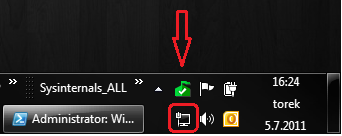
2. Choose “Open
Network And Sharing Center”


3. Next click to
“Change Adapter Settings”
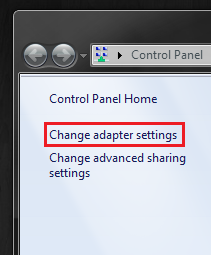

4. Right click on
your network adapter and choose “Properties”


*network adapter ni bergantung pada modem anda guna ada nama huawei, zte dan lain-lain.
5. On your
network adapter click to “Internet Protocol Version 4″ and Properties.


6. When you open
the “Properties” you hit on button “Advanced”
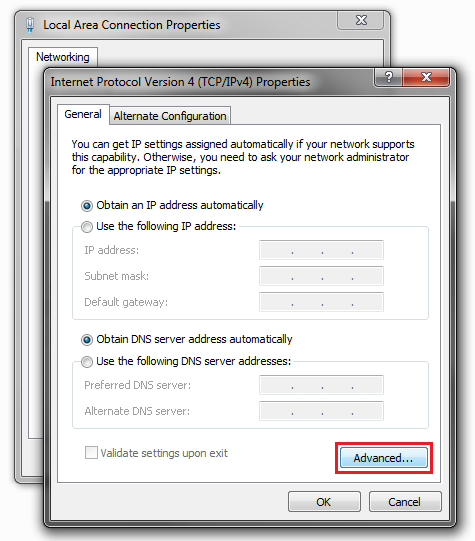

7. When you click
to Advanced button, Windows will open “Advanced TCP/IP Settings”
In that last window you click on “WINS” tab and then choose “Disable NetBIOS over TCP/IP”
In that last window you click on “WINS” tab and then choose “Disable NetBIOS over TCP/IP”
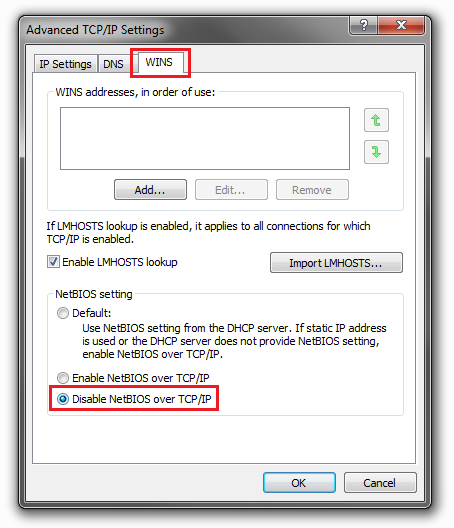

And NetBIOS over
TCP/IP is Disabled.
FINISH..!!
FINISH..!!